All ProjectsUX / Design Case Study

Selected Work / UX Design

Events & Registration Platform

Designing and engineering a connected event experience that simplifies event discovery, registration, internal coordination, and sales follow-up.

Company

Madison Trust Company

My Role

Front-End Developer

Discipline

UX Strategy & Design

Focus

Research & Problem Solving

Events & Registration Platform project showcase

Project Overview

Scroll to explore ↓

Chapter 01

Understanding the challenge

Understanding the problem.

Madison Trust's in-person networking events were attracting prospective and existing clients, with event attendees showing strong potential to convert into customers. Sales and marketing recognized an opportunity to make these events a more accessible and scalable part of their lead-generation strategy.

However, event information was maintained in shared Excel spreadsheets by the events team. There was no connected process for automatically publishing upcoming events to the website, creating registration experiences, or passing attendee information into the sales workflow.

The challenge was to connect multiple teams and systems into a reliable event experience that made it easier for attendees to discover and register for events, while reducing manual coordination and helping sales representatives follow up with interested prospects.

Chapter 02

Research & Discovery

Understanding the needs of every team.

I began by gathering requirements from sales, marketing, and event coordinators to understand how events were organized, what information needed to be displayed publicly, and how attendee registrations would support existing business processes.

Working with the events team, I examined their existing Excel-based planning process to understand how event details, dates, locations, confirmation statuses, and capacity information were maintained and updated.

I also identified the different needs of the people interacting with the system. Attendees needed a straightforward way to find and register for events. Event coordinators needed accurate registration information and capacity tracking. Sales representatives needed access to prospective attendees for follow-up, while marketing needed reusable registration links and campaign attribution.

These findings revealed an opportunity to build a connected experience around the tools the teams already used, rather than introducing an entirely new event management process.

Chapter 03

Planning & Strategy

Connecting existing workflows into one experience.

Rather than replacing the event coordinators' existing spreadsheet, I planned an integration that could transform their current data into structured information the website could consume. This allowed the events team to maintain a familiar workflow while supporting automated event publishing.

I mapped the data flow from the spreadsheet to the website, including an hourly synchronization process, a custom WordPress API endpoint, and conditional logic for displaying events based on confirmation status and date.

Next, I planned the attendee journey: discover an event, review its details, register through a dedicated event page, and receive the appropriate follow-up. Each registration page would be generated dynamically using an event-specific URL, allowing the same interface to support multiple events and marketing campaigns.

I also mapped the internal registration workflow, including duplicate checks, capacity validation, updates to the attendee spreadsheet, Salesforce contact matching, and round-robin assignment of eligible prospects to sales representatives.

The goal was to create a cohesive experience that connected customer-facing interactions with the operational systems supporting them.

Chapter 04

Design & Execution

Building the connected event experience.

Translating research and planning into a guided onboarding experience and a flexible website design system.

04.01

Automating event data synchronization

I developed an automated process that checked the events team's Excel spreadsheet every hour for updates. The retrieved information was transformed into structured JavaScript objects that could be used by the website.

To support this integration, I built a custom WordPress plugin that exposed an API endpoint for receiving POST requests with updated event data.

This created a connection between internal event planning and the public website, allowing changes made by event coordinators to flow into the digital experience without requiring someone to manually recreate each event.

04.02

Creating a dynamic events calendar

Using the synchronized event data, I developed a public-facing events experience that allowed prospective and existing clients to discover upcoming networking opportunities.

I implemented conditional rendering rules so that events would only appear when they met the appropriate requirements, such as having a confirmed status and a date that had not already passed.

The calendar provided a centralized destination for event information and gave marketing and sales a consistent way to direct interested attendees toward registration.

04.03

Designing the registration experience

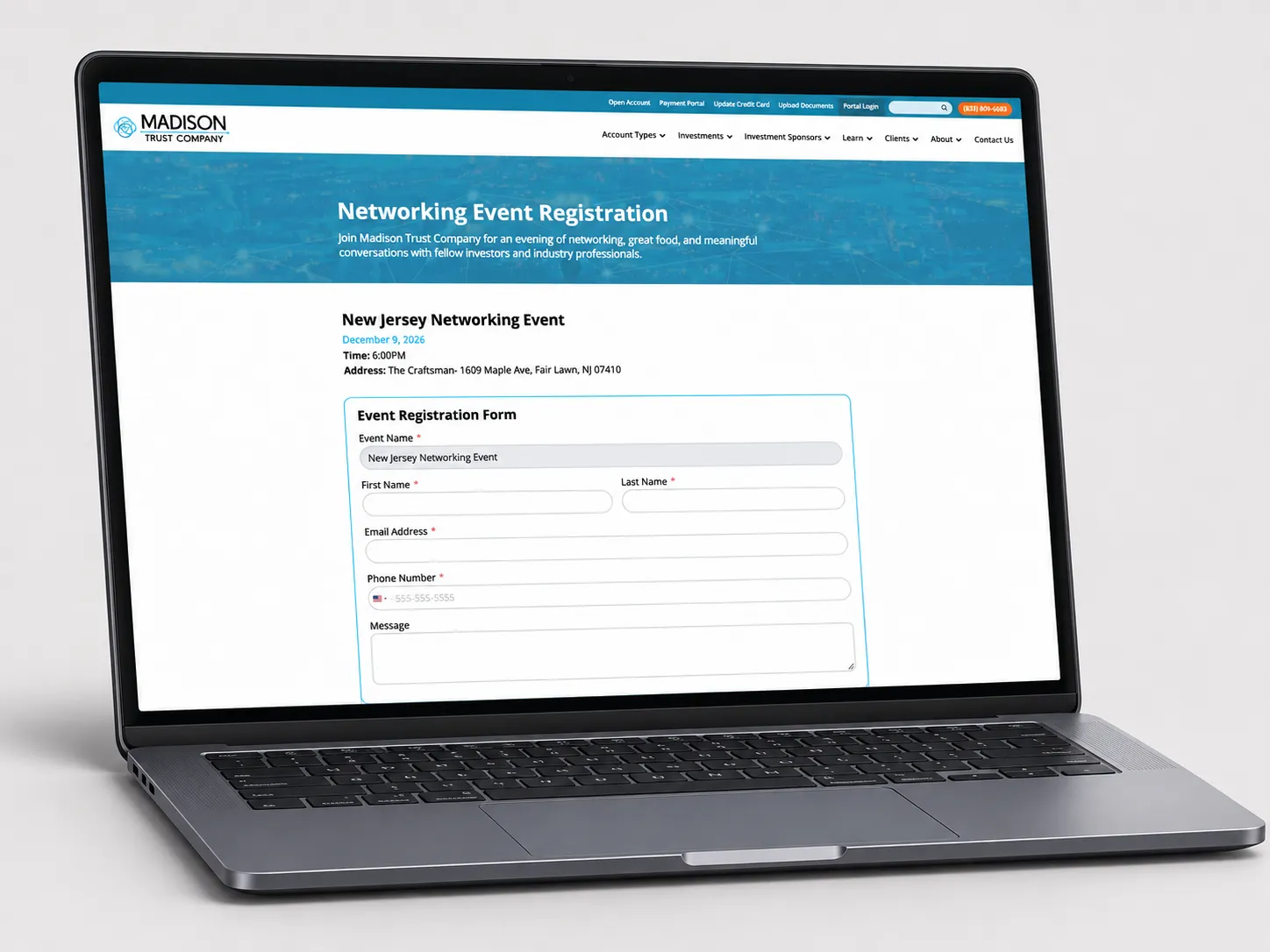
I created a reusable registration experience that dynamically loaded information for a specific event based on its URL. Each event received a unique registration link generated from its name, eliminating the need to manually build separate registration pages.

These links could be shared through the events calendar, marketing emails, and promotional campaigns. UTM parameters allowed the team to attribute registrations to different marketing sources.

The registration form captured attendee information and initiated the automated processes needed to coordinate attendance and sales follow-up.

04.04

Automating registrations and capacity tracking

Once an attendee submitted the registration form, their information entered a Zapier automation that checked whether they had already registered for the selected event.

For new registrations, the workflow updated the event team's registration spreadsheet so coordinators could access attendee information through their existing process.

The automation also checked event capacity and updated registration totals as submissions were processed. This helped enforce attendance limits and provided the events team with a more consistent way to monitor available spots.

04.05

Connecting registrations to Salesforce

To support sales follow-up, I extended the automation to check Salesforce for existing client and lead records using the information submitted during registration.

When an attendee wasn't already represented in the CRM, the workflow could create or route them as a new prospect and assign a sales representative using a round-robin process across three team members.

This connected event participation to the existing sales process, giving representatives a clearer opportunity to engage with prospective clients who had already expressed interest by registering for an in-person event.

04.06

Iterating from real-world attendee behavior

After launch, we discovered that some attendees were bringing guests who weren't accounted for in the original registration process. This created discrepancies between the number of registrations and the actual number of people attending an event.

I updated the registration experience to include an optional +1 checkbox with contextual guidance explaining the guest limit. When selected, the additional attendee could be included in the registration count, improving capacity planning without introducing an unnecessarily complicated guest-selection interface.

Another operational challenge emerged around verifying attendance at the event itself. To address this, I began developing an iPad-based check-in tool that would allow event staff to compare arriving attendees against the registration list and discourage unregistered entry.

These improvements reflected an ongoing process of evaluating how the experience performed in real situations and adjusting the product to better support attendees and event staff.

Chapter 05

Outcomes & Takeaways

The outcome and what I learned.

Project Results

The platform connected event planning, website promotion, registration, and sales follow-up into a coordinated workflow, while allowing event coordinators to continue working with their existing spreadsheets.

Sales and marketing gained a reusable way to promote upcoming events and capture attendee information. Registrations could be checked against existing records, shared with event coordinators, and connected to Salesforce for potential follow-up.

Post-launch feedback led to improvements in guest registration and attendance accounting, while identifying the need for an additional event check-in experience that is currently in development.

This project reinforced the importance of understanding the complete user journey, including the internal processes that support it. By combining UX problem-solving, front-end development, API integrations, and automation, I was able to connect multiple systems into an experience designed around the needs of both attendees and internal teams.

Continue Exploring

Explore more of my work.

More projects focused on design, development, and solving real-world problems.

View All Projects